Run Your Agency.Track What Matters.
I2P brings your agency tools into one dashboard with overview premiums, Book of Business, agents, leaderboards, reports, War Grounds, Input Tracker, Resources, and Training Center.
- Dashboard, leaderboards & reports
- Book of Business & policy tracking
- Agents, invites & downline views
- Input Tracker, War Grounds, Training & Resources
Everything in Your I2P Sidebar
The same modules your team opens every day: Dashboard, Leaderboards, Input Tracker, Book of Business, Agents, Reports, War Grounds, Resources, and Training Center.
Dashboard Overview
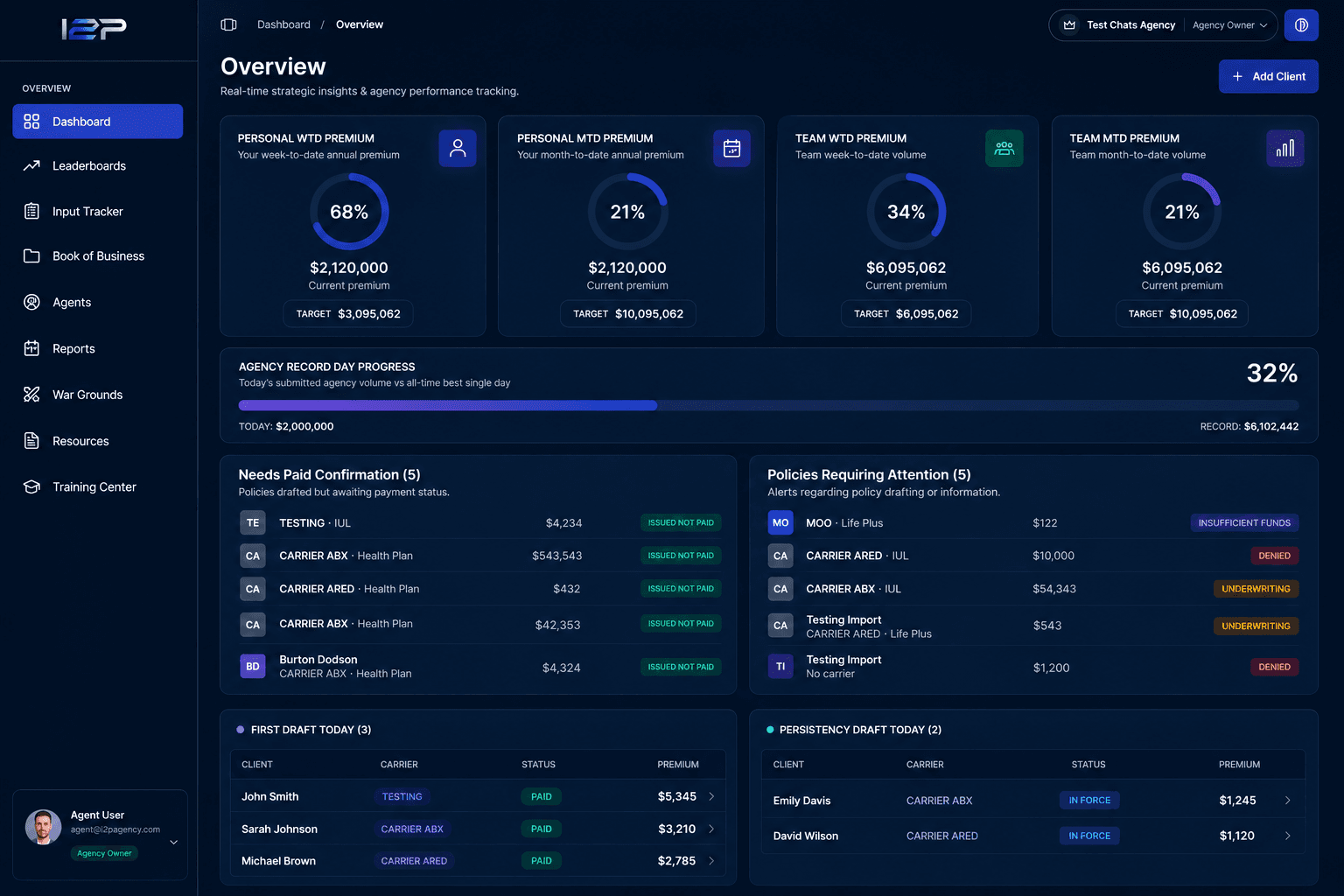
See Personal & Team WTD/MTD premium against goals, Agency Record Day Progress, policies needing attention, and today’s draft lists, all on one overview.
Input Tracker
Track Dials, Conversations, Presentations & Closes with progress toward daily goals on the same Input Tracker screen in your dashboard sidebar.
Leaderboards
Rank by Annual Premium and sales count across Today, WTD, MTD, and custom ranges: Personal Global, Personal Downline, Agency Global & Agency Downline.
Book of Business
Manage clients and policies with premium, coverage, carrier, product, status, draft/submit dates, filters, and bulk upload.
War Grounds
Create 1v1 or team challenges scored on Approved AP. Track active showdowns, accept invites, and follow progress through the date range.
Agents & Reports
Invite agents by email, manage profiles and uplines, then pull Production, Policy, Agent, Recruiting, Forecasting & Carrier reports.
Grow Your Issued-to-Paid
I2P helps agencies close the gap between submitted business and paid production using the same Overview, Book of Business, and Reports screens already in your dashboard.
"I don’t understand why our agency’s issued-to-paid is down this month. I thought we had a great month."
Strong submission months can still show weak issued-to-paid when policies sit in draft, stay marked Issued not paid, or never get confirmed as paid.
I2P surfaces the policies that should count toward your issued-to-paid report, so you know exactly which cases to confirm or follow up on.
- Needs Paid Confirmation on Overview
- Issued not paid status in Book of Business
- My Performance Paid % in Reports
- IP Policy Report with draft & submit dates
Spot what’s missing
Open Dashboard Overview for Needs Paid Confirmation and Policies Requiring Attention. See drafted policies still awaiting payment status or follow-up.
Track today’s drafts
Review First Draft Today and Persistency Draft Today on Overview so nothing slips past draft day without a clear next step for your team.
See Issued Not Paid
Book of Business tracks each policy with Active Paid and Issued not paid statuses, plus draft dates, submit dates, carrier, and premium.
Run the IP reports
Reports includes IP Policy Report, IP Projections, My Performance (Paid vs Issued Not Paid & Paid %), and Policy Drafting Forecast by draft date.
How Your Team Uses the Dashboard
A simple loop that maps to real I2P screens: invite agents, track business, review overview & reports, compete, then train.
Sign In & Invite Your Team
Create your account, then invite agents by email from Agents. New agents complete onboarding and join your agency roster with upline assignments.
Log Clients, Policies & Inputs
Add clients and policies in Book of Business. Use Input Tracker for Dials, Conversations, Presentations & Closes. Set Personal & Team WTD/MTD premium goals in Profile.
Review the Dashboard
Open Overview for Personal/Team WTD & MTD premium, Agency Record Day Progress, policies needing paid confirmation, and draft lists, then dig deeper in Reports.
Compete on Leaderboards & War Grounds
Climb rankings by Annual Premium and sales across Today, WTD, MTD & custom ranges. Start 1v1 or team War Grounds challenges scored on Approved AP.
Train & Support Your Agents
Browse Resources for carriers, FAQs, documents, and custom links. Use Training Center categories, playlists, and videos. Open a support ticket when you need help.
Built for Life Insurance Agencies
I2P is the agency platform behind your dashboard with tools for production, people, competition, resources, and training without the spreadsheet chaos.
Built for Agency Workflows
I2P is designed around how life insurance agencies actually operate with production tracking, agent management, and daily accountability in one place.
One Dashboard for the Team
Owners and agents share the same system: Overview, Book of Business, Leaderboards, Reports, War Grounds, Resources, and Training Center.
Clarity Over Guesswork
From WTD/MTD premium goals to policy status and recruiting reports, every screen is meant to answer what your agency needs to do next.
“Know your numbers, manage your book, develop your agents. That's the daily rhythm I2P is built to support.”
What's Inside
Every module below is a real screen in the I2P dashboard sidebar.
Our Mission
Give every life insurance agency a clear system to track production, manage agents, and grow with accountability.
Our Focus
Ship the tools agencies use daily: overview, book, leaderboards, reports, wars, resources, and training, and keep them accurate to the work.
Core Values
Multiple Layers of Data Protection
I2P protects your agency data with layered security built into the same auth, roles, and profile tools your team already uses in the dashboard.
Secure Sign-In
Authentication is handled by Clerk. Sign-in, sign-up, and password reset flows are managed through a dedicated auth provider, not stored in plain app code.
Account Password Control
Agents and owners can update their password anytime from the Security section on the Profile page inside the dashboard.
Role-Based Dashboard Access
The sidebar and dashboard routes respect your role: Agency Owner, Agent, or App Owner. Agents see only the pages they need; owners manage the full agency workspace.
Agency-Scoped Data
Navigation and page access are filtered by role and agency context. App Owners select an agency before viewing its data; agents operate within their assigned dashboard scope.
Protected API Sessions
Every dashboard API request sends a Bearer access token and your agency ID header. Tokens auto-refresh before expiring, use secure cookies, and expired sessions sign you out automatically.
Privacy-First Data Use
Your personal data is used only to operate the application. We do not sell, rent, or share your information with third parties for marketing purposes.
Everything Agents Need, Inside the Dashboard
Carrier profiles, FAQs, documents, custom resources, plus Training Center categories, playlists, and videos, exactly as they appear in the dashboard.
Resources
Dashboard → Resources
Carrier Resources
Browse carrier profiles with logos, contact info, and quick links, all in one place.
FAQs
Quick answers to common questions from the same FAQs tab in Resources.
Important Documents
View and open forms and files shared with your agency.
Custom Resources
Company-specific resources and links managed by your agency.
Training Center
Dashboard → Training
Training Categories
Browse training by category with the same structure as Training Center Manage/Browse.
Video Playlists
Open playlists with titles, descriptions, and video counts.
Training Videos
Watch playlist videos in the Training Center player.
Manage Training Content
Agency owners can use Manage mode to create categories, playlists, and videos for their team.
Questions about I2P?
Reach out for pricing questions or a walkthrough of the dashboard.